Primera Suite

DaVinci Resolve Studio · DCTL Suite

Primera Suite

An opinionated suite of open source color grading DCTLs for primary balancing and some aspects of look development. Studio version of DaVinci Resolve required; tested in Resolve Studio 20.x and 21 beta 2 (may work in other versions).

v0.6.0 — Latest All releases MIT License Math (PDF) File an issue

Primera consolidates the grading approaches I reach for most often in one place, under one name, and with only the controls I actually use. Most of the underlying math comes from publicly-available, tried-and-tested imaging science and from extensive use of open-source DCTLs provided by the generous members of the "color-concerned community."

My personal aesthetic lodestar remains a film-like look, in the broad sense, however not by emulating any specific stock or process (with one sort-of exception; see below). In any case the tools should be flexible enough to achieve a broad range of looks.

The DCTLs are meant to be used in the context of a fully color-managed workflow. They've been used and tested most against OpenDRT, but play well with Resolve's CST, 2499 DRT, ACES 2.0, and well-constructed 3D LUTs.


Primera

Primera.dctl

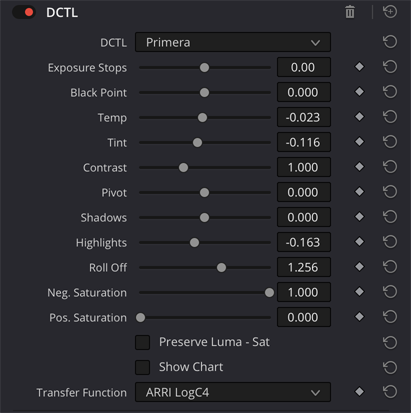
Primera DCTL controls

The foundation. Provides primary grading controls for shot-to-shot balancing across the range of source and working space encodings I encounter most often: ARRI LogC3 and LogC4, Sony S-Log3, REDLog3G10, ACEScct, DaVinci Intermediate, Kodak Cineon, Fuji F-Log2/C, and Panasonic V-Log.

  • Exposure Stops — Linear gain in photographic stops (2n) applied before the selected transfer function
  • Black Point — Smooth compression of the darkest tones approaching black via subtraction of a constant (called "flare" in Baselight)
  • Temp / Tint — White balance operating in linear space
  • Contrast — Log-space tonal stretch/squash around a variable Pivot defaulted to the selected transfer function's mid-grey point
  • Shadows / Highlights — Linear gain constrained to operate below/above mid-grey; no spatial operations so may be encoded in a 3D LUT
  • Roll Offtanh highlight compression; works with Highlights to control the shoulder's curve shape
  • Neg. Saturation — Multiplicative negative gain on chroma
  • Pos. Saturation — HSV-based "density" boost
  • Preserve Luma - Sat — Both Saturation controls will only darken the image, this option offsets (via positive linear gain) this consequence
  • Show Chart — Per-transfer-function stop-graduated step chart, à la the chart shown here by Walter Volpatto

Primera Hue

PrimeraHue.dctl

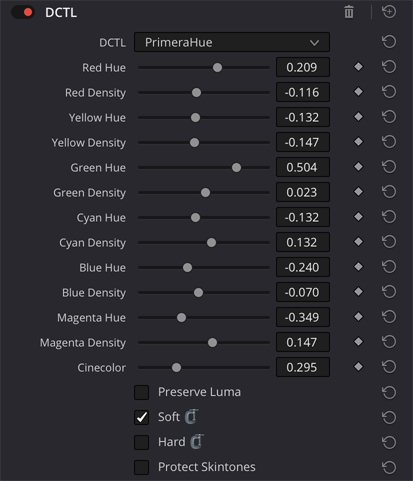
PrimeraHue DCTL controls

Per-channel hue and density control via tetrahedral interpolation, based on hotgluebanjo's DCTL implementation of an approach described by Steve Yedlin ASC in his DisplayPrep demo and follow-up discussion from 2018.

  • 6 Hue sliders (R/Y/G/C/B/M) — Rodrigues' rotation around each corner's achromatic axis; +/−60° per channel covers the full 360° disc in HSV
  • 6 Density sliders — Makes the shifted color subjectively more colorful without adding energy
  • Preserve Luma — Restores pre-adjustment luminance by uniform gain, after the interpolation and before Cinecolor
  • Soft / Hard Squeezetanh shoulder + exponential toe compression applied last, or a hard clip of the rotated corner values to [0,1] before interpolation; both can be applied or just one
  • Cinecolor — Emulates a largely forgotten "budget" two-strip color process in use from the late 1930s to the early 1950s. Conceptually similar to Technicolor Process 2, Cinecolor used bi-packed ortho negatives and duplitized print stock (emulsion on both sides of the base). Here for you now in 2026 without the registration nightmares
  • Protect Skintones — Applies only to Cinecolor; creates a holdout matte centered on ~28° HSV with smooth falloff

Note that tetrahedral interpolation is only defined on the unit cube, so any pixel with a channel outside [0,1] passes straight through. Feed this one a log signal, not scene-linear.

Primera Split

PrimeraSplit.dctl

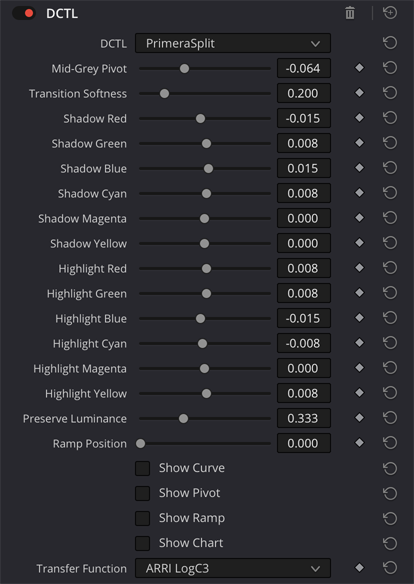
PrimeraSplit DCTL controls

Subtractive color split-toning for imbuing shadows and highlights with (usually) contrasting color casts. Lately conceptualized less as an effect and more as a fundamental look development tool, defining the chroma vectors of the characteristic curve.

  • Mid-Grey Pivot — Defaults to the selected transfer function's mid-grey but best set by eye
  • Transition Softness — Controls the blend width between shadow and highlight zones
  • Preserve Luminance — As in Primera and PrimeraHue
  • Show Ramp — Overlays a greyscale ramp put through the identical toning pipeline, so it reads the actual tint at every tonal position rather than a model of it
  • Ramp Position — Positions the greyscale ramp vertically; useful when working under blanking
  • Show Curve / Show Pivot / Show Chart — Diagnostic overlays for curve shape, pivot position and transition softness, and the same per-TF stop chart as in Primera

Primera Skin

PrimeraSkin.dctl

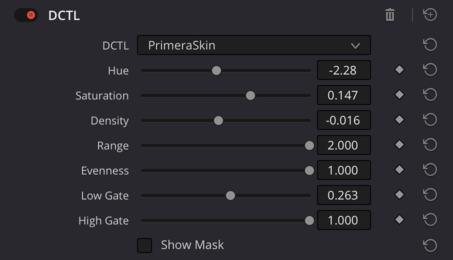
PrimeraSkin DCTL controls

A dedicated skintone sculpting tool operating in HSV, meant for log-based sources/groups/timelines. Everything outside the mask passes through untouched.

Detection works in rg-chromaticity rather than a plain hue/saturation slice: normalizing by r+g+b makes the ratios invariant to overall brightness, so one gate catches fair and dark skin equally well instead of tracking lightness. A hue gate centered on the nominal skin angle (~28°) rides on top of that to keep Range meaningful — the "fuzzy pie slice," now with a chromaticity gate in front of it. Gamut containment via the same tanh / exponential soft squeeze used throughout, here scaled by the mask so pooled-in background pixels don't get a squeeze halo.

  • Hue — Rotates skin hue (+/−20°)
  • Saturation — Scales HSV saturation within the mask
  • Density — Adjusts value/brightness (positive = darker)
  • Range — Widens or narrows the skin mask (0.25 = tight, 2.0 = broad)
  • Soften — Spatial pooling of the mask. The per-pixel mask is a pure function of one pixel's RGB, so grain dithers borderline pixels across the gate edges and leaves a stochastic "salt" of under-adjusted pixels inside otherwise solid skin — the pointillist look Density used to have when pushed. Soften pools the mask over a sparse 37-tap neighborhood weighted by distance and chroma similarity, then soft-unions the result with the pixel's own mask, so it can only fill holes and never erode a confident edge. Resolution-independent radius; at 0 no taps are made at all
  • Evenness — Compresses hues toward the skin center; emulates HMU evening-out talent skintones on set
  • Separation — New in v0.6, and the one control here that acts on everything that isn't skin. It inverts the pooled skin mask and uses it to gate a gentle hue migration toward the band opposite the skin vector — skin sits at 28°, its complement at ~208°, the cyan/teal band. Formally it's a smooth sinusoidal field on the hue circle with the complement as a stable attractor and the skin hue itself as an unstable equilibrium, so skin-hued pixels take zero push from the field before the mask even gates them. The mechanism under the teal-and-orange look, with a scalpel instead of a LUT: complementary opposition between warm subject and cool field reads to the eye as depth. The push is chroma-weighted, so it redistributes color already in the frame rather than tinting neutrals, and it's capped at ~30% migration — a band, not a point. Reds are the known casualty; crimson drifts toward magenta well before the slider ceiling
  • Low / High Gate — Value-based gates excluding dark or bright pixels from the mask
  • Show Mask — Three-zone false-color overlay shows the "skin zone" in yellow/gold; magenta denotes pixels outside of the skin vector in the clockwise direction and green too far counter-clockwise. Usable with most transfer functions but best observed in a Log encoding.
  • Legend — displays a key for the three zones in a gradient strip across the bottom of the viewer

Notes

Inspiration & Prior Art

There's not much particularly new or original in the Primera tools. They're a curated, opinionated collection of my favorite approaches to primary grading. 90%+ of Primera's existence is owed to the work, and generosity, of: